lunes, 7 de diciembre de 2020

GIT Demystifying part 12, Branch & Merge

 GIT Demystifying part 12

Branch & Merge

Create a Y tree
git merge branch
git diff
git diff --ours
git diff --theirs
git diff --base
git checkout --conflict=diff3 filename
git log --oneline --all --decorate --graph
git log --oneline HEAD...MERGE_HEAD
git log --cc -p -1
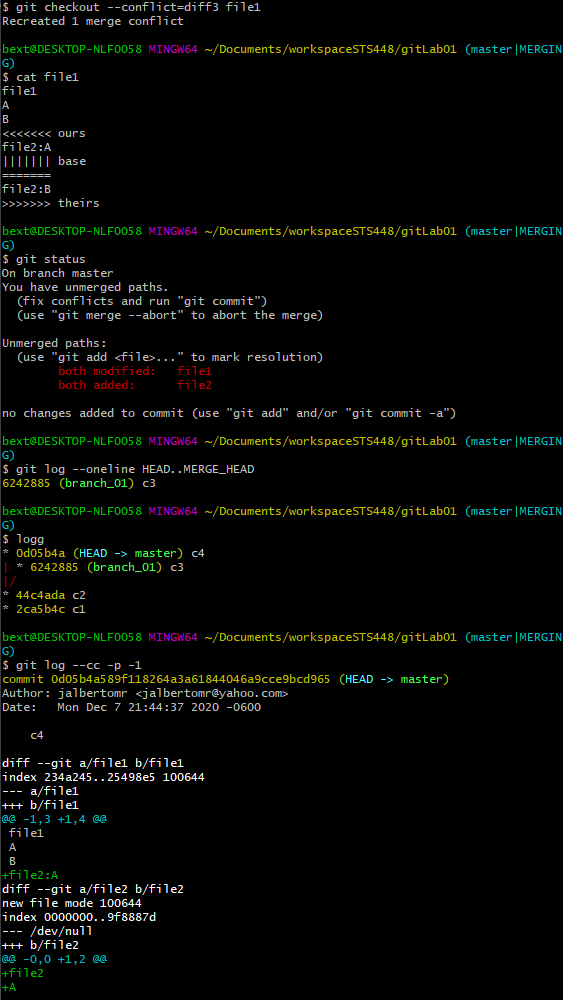
git merge --abort

Create a Y tree

$ git init
Initialized empty Git repository in C:/Users/bext/Documents/workspaceSTS448/gitLab01/.git/

bext@DESKTOP-NLF0058 MINGW64 ~/Documents/workspaceSTS448/gitLab01 (master)
$ vi file1

bext@DESKTOP-NLF0058 MINGW64 ~/Documents/workspaceSTS448/gitLab01 (master)
$ git commit -am "c1"
On branch master

Initial commit

Untracked files:
        file1

nothing added to commit but untracked files present

bext@DESKTOP-NLF0058 MINGW64 ~/Documents/workspaceSTS448/gitLab01 (master)
$ git add f*
warning: LF will be replaced by CRLF in file1.
The file will have its original line endings in your working directory

bext@DESKTOP-NLF0058 MINGW64 ~/Documents/workspaceSTS448/gitLab01 (master)
$ git commit -am "c1"
[master (root-commit) 2ca5b4c] c1
 1 file changed, 2 insertions(+)
 create mode 100644 file1

bext@DESKTOP-NLF0058 MINGW64 ~/Documents/workspaceSTS448/gitLab01 (master)
$ logg
* 2ca5b4c (HEAD -> master) c1

bext@DESKTOP-NLF0058 MINGW64 ~/Documents/workspaceSTS448/gitLab01 (master)
$ vi file1

bext@DESKTOP-NLF0058 MINGW64 ~/Documents/workspaceSTS448/gitLab01 (master)
$ git commit -am "c2"
warning: LF will be replaced by CRLF in file1.
The file will have its original line endings in your working directory
[master 44c4ada] c2
 1 file changed, 1 insertion(+)

bext@DESKTOP-NLF0058 MINGW64 ~/Documents/workspaceSTS448/gitLab01 (master)
$ logg
* 44c4ada (HEAD -> master) c2
* 2ca5b4c c1

bext@DESKTOP-NLF0058 MINGW64 ~/Documents/workspaceSTS448/gitLab01 (master)
$ git branch branch_01

bext@DESKTOP-NLF0058 MINGW64 ~/Documents/workspaceSTS448/gitLab01 (master)
$ logg
* 44c4ada (HEAD -> master, branch_01) c2
* 2ca5b4c c1

bext@DESKTOP-NLF0058 MINGW64 ~/Documents/workspaceSTS448/gitLab01 (master)
$ ls
file1  gitLab01.iml  src/

bext@DESKTOP-NLF0058 MINGW64 ~/Documents/workspaceSTS448/gitLab01 (master)
$ cat file1
file1
A
B

bext@DESKTOP-NLF0058 MINGW64 ~/Documents/workspaceSTS448/gitLab01 (master)
$ git checkout branch_01
Switched to branch 'branch_01'

bext@DESKTOP-NLF0058 MINGW64 ~/Documents/workspaceSTS448/gitLab01 (branch_01)
$ logg
* 44c4ada (HEAD -> branch_01, master) c2
* 2ca5b4c c1

bext@DESKTOP-NLF0058 MINGW64 ~/Documents/workspaceSTS448/gitLab01 (branch_01)
$ vi file1

bext@DESKTOP-NLF0058 MINGW64 ~/Documents/workspaceSTS448/gitLab01 (branch_01)
$ vi file2

bext@DESKTOP-NLF0058 MINGW64 ~/Documents/workspaceSTS448/gitLab01 (branch_01)
$ cat filea
cat: filea: No such file or directory

bext@DESKTOP-NLF0058 MINGW64 ~/Documents/workspaceSTS448/gitLab01 (branch_01)
$ cat file1
file1
A
B
file2:B

bext@DESKTOP-NLF0058 MINGW64 ~/Documents/workspaceSTS448/gitLab01 (branch_01)
$ cat file2
file2
B

bext@DESKTOP-NLF0058 MINGW64 ~/Documents/workspaceSTS448/gitLab01 (branch_01)
$ git add f*
warning: LF will be replaced by CRLF in file1.
The file will have its original line endings in your working directory
warning: LF will be replaced by CRLF in file2.
The file will have its original line endings in your working directory

bext@DESKTOP-NLF0058 MINGW64 ~/Documents/workspaceSTS448/gitLab01 (branch_01)
$ git commit -m "c3"
[branch_01 6242885] c3
 2 files changed, 3 insertions(+)
 create mode 100644 file2

bext@DESKTOP-NLF0058 MINGW64 ~/Documents/workspaceSTS448/gitLab01 (branch_01)
$ logg
* 6242885 (HEAD -> branch_01) c3
* 44c4ada (master) c2
* 2ca5b4c c1

bext@DESKTOP-NLF0058 MINGW64 ~/Documents/workspaceSTS448/gitLab01 (branch_01)
$ git checkout master
Switched to branch 'master'

bext@DESKTOP-NLF0058 MINGW64 ~/Documents/workspaceSTS448/gitLab01 (master)
$ vi file1

bext@DESKTOP-NLF0058 MINGW64 ~/Documents/workspaceSTS448/gitLab01 (master)
$ vi file2

bext@DESKTOP-NLF0058 MINGW64 ~/Documents/workspaceSTS448/gitLab01 (master)
$ git add f*
warning: LF will be replaced by CRLF in file2.
The file will have its original line endings in your working directory

bext@DESKTOP-NLF0058 MINGW64 ~/Documents/workspaceSTS448/gitLab01 (master)
$ git commit -m "c4"
[master 0d05b4a] c4
 2 files changed, 3 insertions(+)
 create mode 100644 file2

bext@DESKTOP-NLF0058 MINGW64 ~/Documents/workspaceSTS448/gitLab01 (master)
$ cat file1
file1
A
B
file2:A

bext@DESKTOP-NLF0058 MINGW64 ~/Documents/workspaceSTS448/gitLab01 (master)
$ cat file2
file2
A

bext@DESKTOP-NLF0058 MINGW64 ~/Documents/workspaceSTS448/gitLab01 (master)
$ logg
* 0d05b4a (HEAD -> master) c4
| * 6242885 (branch_01) c3
|/
* 44c4ada c2
* 2ca5b4c c1

git merge branch
git diff
git diff --ours
git diff --theirs
git diff --base


git checkout --conflict=diff3 filename
git log --oneline --all --decorate --graph
git log --oneline HEAD...MERGE_HEAD
git log --cc -p -1


git merge --abort


git merge branch_01, again


Concrete the merge by commiting


eot


domingo, 6 de diciembre de 2020

GIT Demystifying part 11, Branch & Merge

GIT Demystifying part 11

Branch & Merge

Doing a merge with a tree like "Y" without data files.
Doing a merge with a tree like "Y" with data files.
To Undo the Merge.
See the effect of apply merge over the opposite branch.


Doing a merge with a tree like "Y" without data files.

command line procedure


f


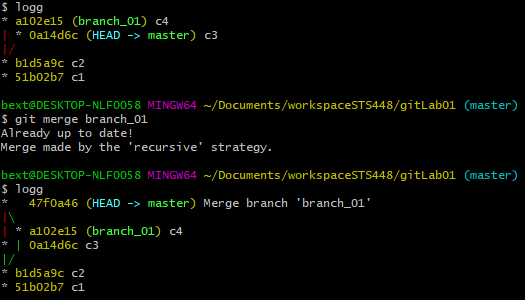
Redoing the tree, but merging from master the branch, the same result.


Doing a merge with a tree like "Y" with data files.

Create a tree with one branch, one file on commit 1, and two files on the other commits.


Command line procedure


2


3


To Undo the Merge 

Now apply de command 

git reset --hard (address of commit2 "c2")

This operation set HEAD and branch master on c2, exaclty as before merge.


The content of files are as previous the merge.


See the effect of apply merge over the opposite branch

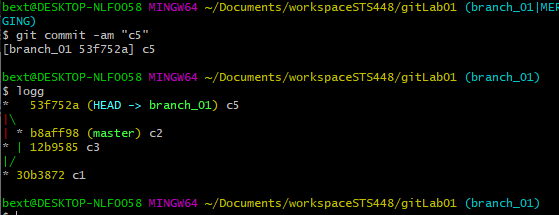
Lets checkout the branch_01 and merge master, and see the effect. for short, this will order the lines on conflict in alternate order. this mean, first the line of branch_01 followed by line of master. And set the HEAD on branch_01, where originally where called the merge.

command line procedure.


And finally to finish the merge, do the commit.


eot

sábado, 5 de diciembre de 2020

GIT Demystifying part 10, Branch & Merge

GIT Demystifying part 10, Branch & Merge
Simple Branch and Merge

Lest start with a simple trip with four commits and one branch.


To start with this lab, At directory of work clean and initialize our git.

rm -r .git

git init

Also check the directory is empty, without previos files from this lab. use the follow alias for show the commits.

alias log="git log --all --oneline --decorate --graph"

We will represent a work flow of do a work on the main branch master which is automatically created on the first commit, and then create a branch were the work will progress over an specific feature in order to be integrated on the master branch. To start, we will not work with any file, just build the road or tree to be simple example, with no conflicts to solve.


To create the tree, for short, create two commits, on the second commit, create branch_01, change HEAD to branch_01 (checkout), and create two commits more. then move the HEAD to second commit.


At this point the tree is similar with the previous frame at exception of the ids of the commits.

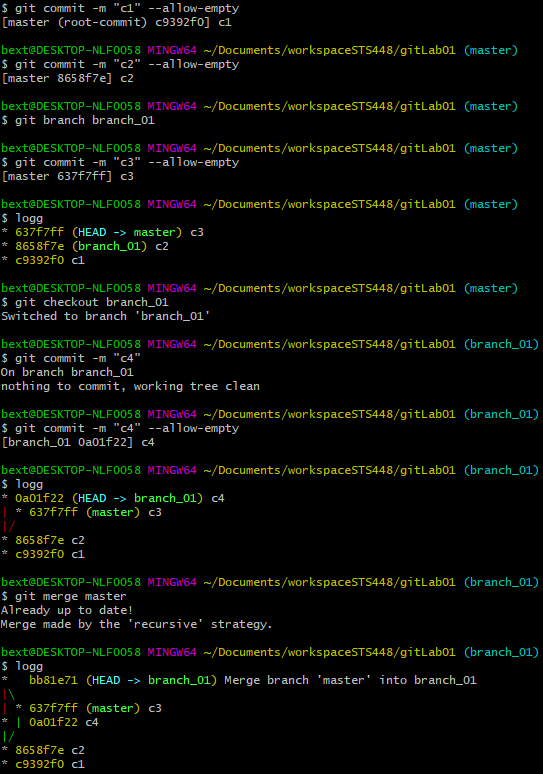
Merge the branch_01 into master. the merge report the message fast-forward, that is the algoritm that uses merge when the commits are on line without interruptions of branches between them.
Then recover the state previous of the merge with git reset --hard commit2, then move HEAD to branch_01 and merge master on it. The merge report Already up to date.


Now use data in commits with the same algoritm of creation and manipulation of the tree, on the progression of the data in commits do not write diferent things on same lines to simplify the sample and avoid merge conflicts for now.

$ git init
Initialized empty Git repository in C:/Users/bext/Documents/workspaceSTS448/gitLab01/.git/

bext@DESKTOP-NLF0058 MINGW64 ~/Documents/workspaceSTS448/gitLab01 (master)
$ vi file1

bext@DESKTOP-NLF0058 MINGW64 ~/Documents/workspaceSTS448/gitLab01 (master)
$ git commit -m "c1"
On branch master

Initial commit

Untracked files:
        file1

nothing added to commit but untracked files present

bext@DESKTOP-NLF0058 MINGW64 ~/Documents/workspaceSTS448/gitLab01 (master)
$ git add f*
warning: LF will be replaced by CRLF in file1.
The file will have its original line endings in your working directory

bext@DESKTOP-NLF0058 MINGW64 ~/Documents/workspaceSTS448/gitLab01 (master)
$ git commit -m "c1"
[master (root-commit) 7a33bdd] c1
 1 file changed, 2 insertions(+)
 create mode 100644 file1

bext@DESKTOP-NLF0058 MINGW64 ~/Documents/workspaceSTS448/gitLab01 (master)
$ logg
* 7a33bdd (HEAD -> master) c1

bext@DESKTOP-NLF0058 MINGW64 ~/Documents/workspaceSTS448/gitLab01 (master)
$ vi file1

bext@DESKTOP-NLF0058 MINGW64 ~/Documents/workspaceSTS448/gitLab01 (master)
$ git commit -am "c2"
warning: LF will be replaced by CRLF in file1.
The file will have its original line endings in your working directory
[master c5159ba] c2
 1 file changed, 1 insertion(+)

bext@DESKTOP-NLF0058 MINGW64 ~/Documents/workspaceSTS448/gitLab01 (master)
$ logg
* c5159ba (HEAD -> master) c2
* 7a33bdd c1

bext@DESKTOP-NLF0058 MINGW64 ~/Documents/workspaceSTS448/gitLab01 (master)
$ git branch branch_01

bext@DESKTOP-NLF0058 MINGW64 ~/Documents/workspaceSTS448/gitLab01 (master)
$ logg
* c5159ba (HEAD -> master, branch_01) c2
* 7a33bdd c1

bext@DESKTOP-NLF0058 MINGW64 ~/Documents/workspaceSTS448/gitLab01 (master)
$ git checkout branch_01
Switched to branch 'branch_01'

bext@DESKTOP-NLF0058 MINGW64 ~/Documents/workspaceSTS448/gitLab01 (branch_01)
$ vi file1

bext@DESKTOP-NLF0058 MINGW64 ~/Documents/workspaceSTS448/gitLab01 (branch_01)
$ vi file2

bext@DESKTOP-NLF0058 MINGW64 ~/Documents/workspaceSTS448/gitLab01 (branch_01)
$ git add f*
warning: LF will be replaced by CRLF in file1.
The file will have its original line endings in your working directory
warning: LF will be replaced by CRLF in file2.
The file will have its original line endings in your working directory

bext@DESKTOP-NLF0058 MINGW64 ~/Documents/workspaceSTS448/gitLab01 (branch_01)
$ git commit -m "c3"
[branch_01 025dda7] c3
 2 files changed, 3 insertions(+)
 create mode 100644 file2

bext@DESKTOP-NLF0058 MINGW64 ~/Documents/workspaceSTS448/gitLab01 (branch_01)
$ logg
* 025dda7 (HEAD -> branch_01) c3
* c5159ba (master) c2
* 7a33bdd c1

bext@DESKTOP-NLF0058 MINGW64 ~/Documents/workspaceSTS448/gitLab01 (branch_01)
$ vi file1

bext@DESKTOP-NLF0058 MINGW64 ~/Documents/workspaceSTS448/gitLab01 (branch_01)
$ vi file2

bext@DESKTOP-NLF0058 MINGW64 ~/Documents/workspaceSTS448/gitLab01 (branch_01)
$ git commit -am "c4"
warning: LF will be replaced by CRLF in file1.
The file will have its original line endings in your working directory
warning: LF will be replaced by CRLF in file2.
The file will have its original line endings in your working directory
[branch_01 2498b06] c4
 2 files changed, 2 insertions(+)

bext@DESKTOP-NLF0058 MINGW64 ~/Documents/workspaceSTS448/gitLab01 (branch_01)
$ logg
* 2498b06 (HEAD -> branch_01) c4
* 025dda7 c3
* c5159ba (master) c2
* 7a33bdd c1

bext@DESKTOP-NLF0058 MINGW64 ~/Documents/workspaceSTS448/gitLab01 (branch_01)
$ cat file1
file1
A
B
->file2 A
->file2 B

bext@DESKTOP-NLF0058 MINGW64 ~/Documents/workspaceSTS448/gitLab01 (branch_01)
$ cat file2
file2
A
B

bext@DESKTOP-NLF0058 MINGW64 ~/Documents/workspaceSTS448/gitLab01 (branch_01)
$ git checkout master
Switched to branch 'master'

bext@DESKTOP-NLF0058 MINGW64 ~/Documents/workspaceSTS448/gitLab01 (master)
$ git merge branch_01
Updating c5159ba..2498b06
Fast-forward
 file1 | 2 ++
 file2 | 3 +++
 2 files changed, 5 insertions(+)
 create mode 100644 file2

bext@DESKTOP-NLF0058 MINGW64 ~/Documents/workspaceSTS448/gitLab01 (master)
$ git status
On branch master
nothing to commit, working tree clean

bext@DESKTOP-NLF0058 MINGW64 ~/Documents/workspaceSTS448/gitLab01 (master)
$ logg
* 2498b06 (HEAD -> master, branch_01) c4
* 025dda7 c3
* c5159ba c2
* 7a33bdd c1

bext@DESKTOP-NLF0058 MINGW64 ~/Documents/workspaceSTS448/gitLab01 (master)
$ git reset --hard c5159ba
HEAD is now at c5159ba c2

bext@DESKTOP-NLF0058 MINGW64 ~/Documents/workspaceSTS448/gitLab01 (master)
$ logg
* 2498b06 (branch_01) c4
* 025dda7 c3
* c5159ba (HEAD -> master) c2
* 7a33bdd c1

bext@DESKTOP-NLF0058 MINGW64 ~/Documents/workspaceSTS448/gitLab01 (master)
$ cat file1
file1
A
B

bext@DESKTOP-NLF0058 MINGW64 ~/Documents/workspaceSTS448/gitLab01 (master)
$ cat file2
cat: file2: No such file or directory

bext@DESKTOP-NLF0058 MINGW64 ~/Documents/workspaceSTS448/gitLab01 (master)
$ git checkout branch_01
Switched to branch 'branch_01'

bext@DESKTOP-NLF0058 MINGW64 ~/Documents/workspaceSTS448/gitLab01 (branch_01)
$ logg
* 2498b06 (HEAD -> branch_01) c4
* 025dda7 c3
* c5159ba (master) c2
* 7a33bdd c1

bext@DESKTOP-NLF0058 MINGW64 ~/Documents/workspaceSTS448/gitLab01 (branch_01)
$ git merge master
Already up to date.

The result are the same of the previous exercise with out files.


The content of the files in this sample does not generate conflict, so in any step is necesary an intervention to solve it.

When merge branch_01 into master, simply move the HEAD and master to branch_01 because there were a progessive work without interference, like never the branch_01 has been existed. more obvious is merge the master on branch_01 where is nothing to do.  


eot
martes, 1 de diciembre de 2020

GIT Demystifying part 9, git reset ADDRESS somefile


GIT Demystifying part 9

git reset [branch] somefile

  This will be something like git reset --hard [branch] somefile, but HEAD will not be moved. this way the file in the branch be copied in the actual index, ready to apply the commands:

git restore --staged file to unstage

git add file to update what will be commited.

git restore file to discard changes in working directory.

Secuence diagram


Procedure in command line to prepare the scenario of two commits with two files.


Now create the branches on the respective commits.


apply git reset principal file1


What we can do now is 
git restore --staged file1   to unstage this mean wd to file1:v2
git add file1    to update what will be commited
git restore file1  to discard changes in working directory

git restore --staged file1


git add file1, leaves the working directory with file1:v2 and nothing to commit.
git restore file1, leaves the working directory with file1:v1 and ready to commit.


eot


lunes, 30 de noviembre de 2020

GIT Demystifying part 8, checkout vs reset

 GIT Demystifying part 8, checkout vs reset

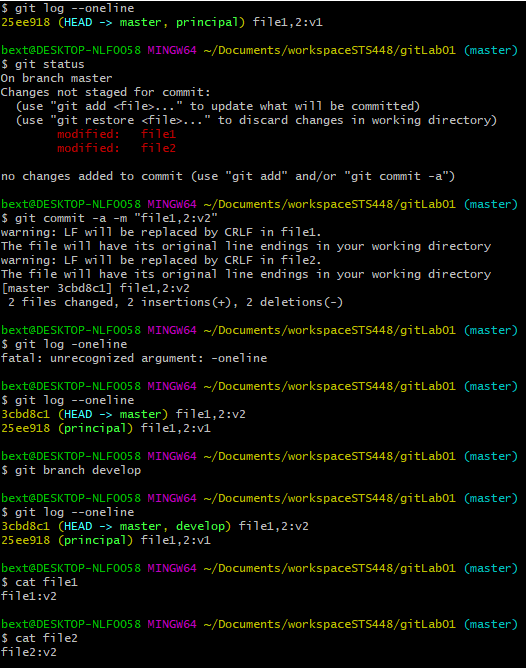
Checkout is simplest as reset. first create a two commits scenario, then do checkout, return state with checkout , and then apply reset.


Procedure on command line

creation of the two commits and branches only for references for reset and checkout.


Till now, here are two commits with two files each.

The checkout to commit 01 (branch principal) only update de State (Working directory, Stage) from commit 2.


And return to develop or commit 2, to apply the reset command.


With Reset, the files are unstaged, with the possibility of add or restore, add apply the commit 2 to commit 1, this is file1:v2 -> file1:v1 = file1:v2, and restore file2:v1 of commit 1 remains intact.

One importan thing is that now branch develop point also to the same as principal.

This not happen with checkout.

Now, How remove de develop branch that point to the same as principal branch? with

git branch -d develop

to do this in the example, we move to de commit 2 with git checkout 3cbd8, and the delete the develop branch.


As HEAD is in commit 2, we can name this again as develop with git branch develop.

eot

martes, 24 de noviembre de 2020

GIT Demystifying part 7 Smash commit, Correct commit where some files has been forgotten

GIT Demystifying part 7 

Smash Commit

Correct commit where some files has been forgotten

Some times we need to return to X commit which don´t have change that are on a recent commit, So integrate the last change to X commit, and clean the posterior commits. its like a smash operation of commits.

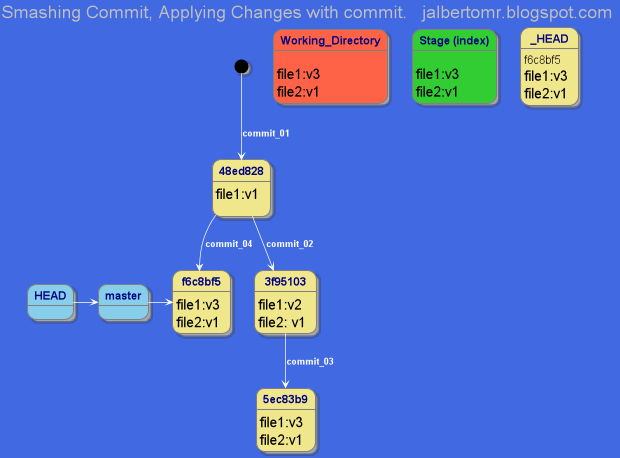
  We have three commits, on the thirth commit we realize that the changes can be integrated to the first commit, we can achieve this task with git reset --soft HEAD~2. , and the state of commit 3 will be translated to commit 1 and be ready to commit or more changes. 


When first commit the state only has the basic changes.


2 Two commits later, we have a new file2, and three change on file1, we want to add this changes to commit 1, and if necesary do more changes and do a new commit. the commits 2 and 3, never mind any more.


The final state one the 4 Commit were made.

Secuence diagram of the operations.

Procedure on command line


eot

GIT Demystifying part 6, git reset ADDRESS -- somefile

GIT Demystifying part 6

git reset ADDRESS -- somefile

This operate over an specific file.


report two diferent states of the same file.


Secuence diagram of the operation.


procedure of 3 commits on command line


After apply command git reset ADDRESS -- somefile, the working directory will have the files of the 3 commit. Now it report two states for the same file1, one to be ready to commit and other as not staged. this mean that only can undo changes over one file.


Same with two files, and reset with one file.


We see that only can do operation over file1.

eot