martes, 24 de noviembre de 2020

GIT Demystifying part 6, git reset ADDRESS -- somefile

GIT Demystifying part 6

git reset ADDRESS -- somefile

This operate over an specific file.


report two diferent states of the same file.


Secuence diagram of the operation.


procedure of 3 commits on command line


After apply command git reset ADDRESS -- somefile, the working directory will have the files of the 3 commit. Now it report two states for the same file1, one to be ready to commit and other as not staged. this mean that only can undo changes over one file.


Same with two files, and reset with one file.


We see that only can do operation over file1.

eot

domingo, 22 de noviembre de 2020

GIT Demystifying part 5, git reset --soft HEAD~

 GIT Demystifying part 5

git reset --soft HEAD~

This command will set the HEAD on his parent, and the working directory and the Stage will have the state of the HEAD commit, with the files staged. ready to commit, or modify and commit.


After the command the files are of the commit 3, a ready to commit.


Secuence diagram of the procedure.


procedure of the 3 commits


After git reset --soft HEAD~, procedure on command line.


eot

sábado, 21 de noviembre de 2020

GIT Demystifying part 4, git reset --mixed HEAD~

GIT Demystifying part 4

git reset --mixed HEAD~ 

This command will set the HEAD on his parent, and the working directory and the Stage will have the state of the HEAD commit, with the files unstaged. ready to add and commit, or modify and commit.


After git reset --mixed HEAD~ the files will be unstaged.


Secuence diagram of the operation.

Procedure of 3 commits on command line


Procedure on Command line.


The status of the file1 will be unstaged.


We have the option to restore the file, to his previos state, file1:v2.


eot

viernes, 20 de noviembre de 2020

GIT Demystifying part 3, git reset --hard HEAD~

 GIT Demystifying part 3

git reset --hard HEAD~


This command return the head to the parent commit, and the state will be of the parent commit.


State is on commit 3.


when apply git reset --hard Head~, head points to his parent, and the state will be updated, the previos state will be lost.


Secuence diagram of operations


initial 3 commits command line


Procedure on command line


eot

jueves, 19 de noviembre de 2020

GIT Demystifying part 2

 GIT Demystifying part 2

 The file1 is modified by user and marked as red because it need to be added in order to be able to commit it, the user undo the changes and disappear of the Stage area. The same undo operation can be achieved simply by the git restore file1 command.

Also can see the diference between git rm and simply rm command.


  Detailed operations on console, for modify file1, create file2, add and commit


Detailed operations on console, for Delete File2 from Working Directory and in Stage ready to Commit
and Delete File1 from Working Directory, Stage.


Actually there no are file1 or file2 on Working Directory. The file can be restored with
git restore file1
or commited with
git commit -a -m "file1 deleted"

At this point we have file2 deleted commited, and file1 deleted from Working Directory.
what we can do with file1.

1.- Restore file1, I mean undelete it, with git restore file1 command.
2.- prepare to commit his delete of file1. with git add file1 command.

eot

miércoles, 18 de noviembre de 2020

GIT Demystifying part 1

 GIT demystifying part 1


  This Diagram shows the basic different git commands to change the state of the files.


References: https://git-scm.com/

Requirements: Git installed

  This Lab demystify by example what happen when git commands are applied. Start with basic commands and see the efects of this command over the different states of Git, this are the Working Directory, the Stage or index, and the History or the Commits.

On this particular case, we use a directory created by an Ide (IntelliJ), so this directory has some files and directories that are not relevant to be considered over the development of this lab, so we use the .gitfile ignore to add this exclusions. simply after create de project with the ide, in the main directory of the project we create the .gitignore file with the next content that can be modified accord to our needs.

file .gitignore :
.gitignore
.idea
.iml
src/

this will leave the git status info clean of files that don´t want to be treated on this lab. Also config the git with personal info, this must be personal accord to each one. this is the name and email that is registered along the commits history.

Config Git

  Open file explorer and select the directory of work, right click over it -> Git bash Here, on this console type the git commands: 

git config --global user.name "jalbertomr"
git config --global user.email "jalbertomr@yahoo.com"
git config --list

1.- Work with file1 create, add and commit

  We will work with one file, first our directory has some native files that own to the project and ignored thanks to .gitignore file.

bext@DESKTOP-NLF0058 MINGW64 ~/Documents/workspaceSTS448/gitLab01 (master)
$ ls -a
./  ../  .git/  .gitignore  .idea/  gitLab01.iml  src/

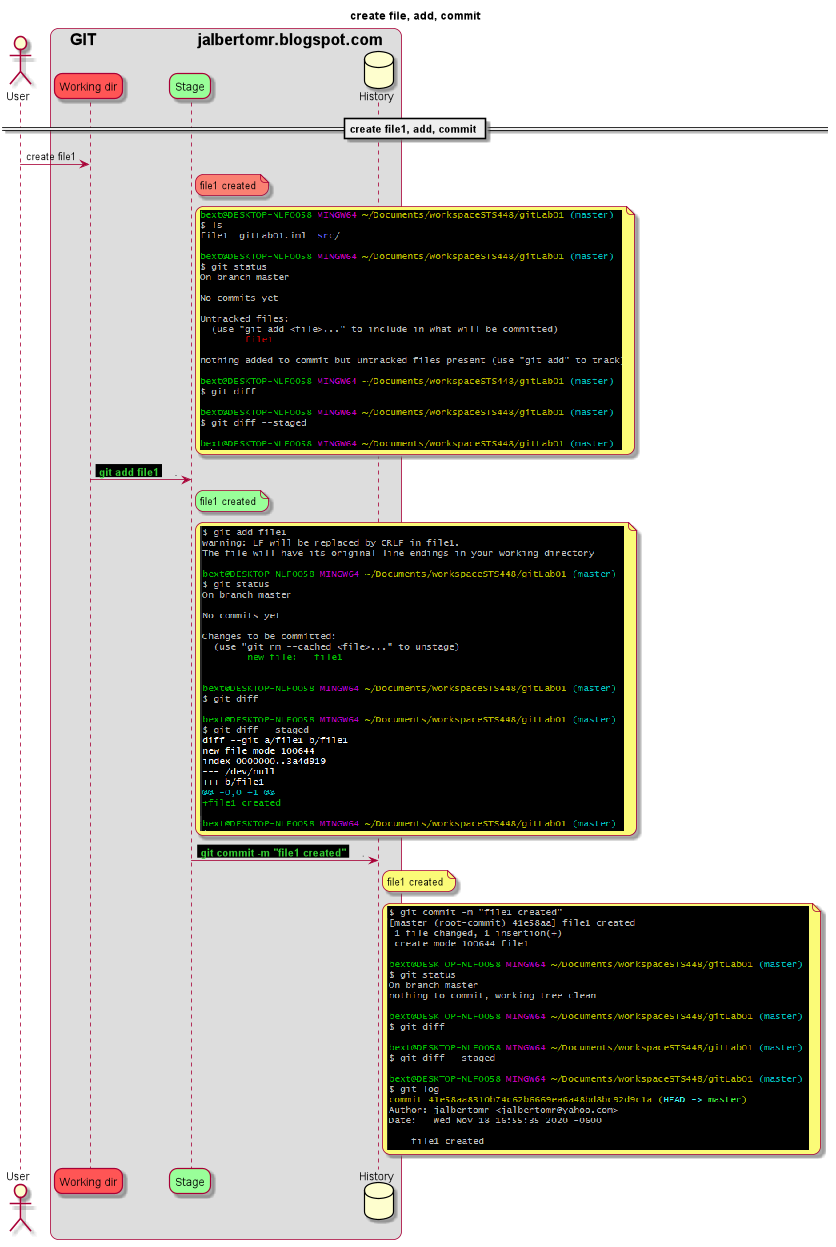
This is a very simple case where create a file1 is added to Stage and Commited.

In Detail the same commands with console response, and showing the result of
git status 
git diff                   : shows the difference between Working Dir and Stage. 
git diff --staged     : shows the difference between Stage and History.

check the color of the unatached file1 in orange and the same file attached by add command change to green. and finally with git log the commit appears.


2.- Work with file2 create, move it from Working Dir to Stage, from Stage to Working Dir and delete it, and never commited.

   Lets create file2 then add it, once staged, return it to unstaged condition to finally remove it, so never commited.


Detailed operacions in console

  The important here is to see that once the file is in Stage, the command git diff --stage, report de diference between Stage and History.


eot

viernes, 2 de octubre de 2020

STS4 Java version Maven Simple Configuration

 STS4 Java version Maven Simple Configuration


1 .- Create a New Maven Project


2.- Create a java program for java 8

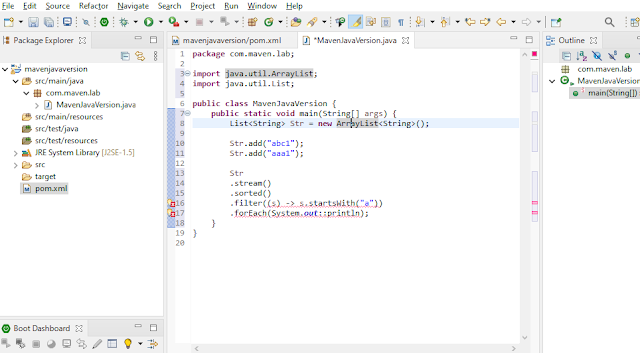
By default the JRE System Library y set to J2SE-1.5, and the code complains because this is not compatible, so in the pom we can specify the java version. 


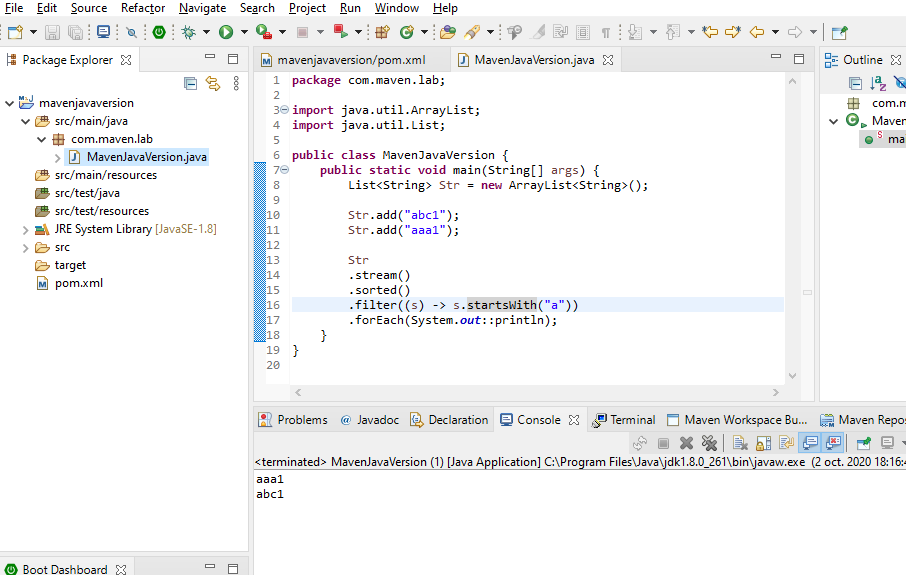
One modified the pom, update the pom, the result is the JRE System Library node change to JavaSE-1.8, and the code stop complain.


Now test the code selecting the class and run as application.


From terminal (Windows -> Show View -> Terminal -> click on icon open terminal
and type mvn clean compile.


Now, modify the pom to specify the output to jar file, and the details for Manifest.

<project xmlns="http://maven.apache.org/POM/4.0.0"
xmlns:xsi="http://www.w3.org/2001/XMLSchema-instance"
xsi:schemaLocation="http://maven.apache.org/POM/4.0.0 https://maven.apache.org/xsd/maven-4.0.0.xsd">
<modelVersion>4.0.0</modelVersion>
<groupId>com.maven.lab</groupId>
<artifactId>mavenjavaversion</artifactId>
<version>0.0.1-SNAPSHOT</version>
<packaging>jar</packaging>

<properties>
<maven.compiler.target>1.8</maven.compiler.target>
<maven.compiler.source>1.8</maven.compiler.source>
</properties>

<build>
<plugins>
<plugin>
<groupId>org.apache.maven.plugins</groupId>
<artifactId>maven-jar-plugin</artifactId>

<configuration>
<archive>
<manifest>
<addClasspath>true</addClasspath>
<mainClass>com.maven.lab.MavenJavaVersion</mainClass>
</manifest>
</archive>
</configuration>

</plugin>
</plugins>
</build>
</project> 

From Terminal type mvn clean compile.

$ mvn clean compile
[INFO] Scanning for projects...
[WARNING]
[WARNING] Some problems were encountered while building the effective model for com.maven.lab:mavenjavaversion:jar:0.0.1-SNAPSHOT
[WARNING] 'build.plugins.plugin.version' for org.apache.maven.plugins:maven-jar-plugin is missing. @ line 18, column 12
[WARNING]
[WARNING] It is highly recommended to fix these problems because they threaten the stability of your build.
[WARNING]
[WARNING] For this reason, future Maven versions might no longer support building such malformed projects.
[WARNING]
[INFO]
[INFO] -------------------< com.maven.lab:mavenjavaversion >-------------------
[INFO] Building mavenjavaversion 0.0.1-SNAPSHOT
[INFO] --------------------------------[ jar ]---------------------------------
[INFO]
[INFO] --- maven-clean-plugin:2.5:clean (default-clean) @ mavenjavaversion ---
[INFO] Deleting C:\Users\bext\Documents\workspaceSTS448\mavenjavaversion\target
[INFO]
[INFO] --- maven-resources-plugin:2.6:resources (default-resources) @ mavenjavaversion ---
[WARNING] Using platform encoding (Cp1252 actually) to copy filtered resources, i.e. build is platform dependent!
[INFO] Copying 0 resource
[INFO]
[INFO] --- maven-compiler-plugin:3.1:compile (default-compile) @ mavenjavaversion ---
[INFO] Changes detected - recompiling the module!
[WARNING] File encoding has not been set, using platform encoding Cp1252, i.e. build is platform

And mvn install

$ mvn install
[INFO] Scanning for projects...
[WARNING]
[WARNING] Some problems were encountered while building the effective model for com.maven.lab:mavenjavaversion:jar:0.0.1-SNAPSHOT
[WARNING] 'build.plugins.plugin.version' for org.apache.maven.plugins:maven-jar-plugin is missing. @ line 18, column 12
[WARNING]
[WARNING] It is highly recommended to fix these problems because they threaten the stability of your build.
[WARNING]
[WARNING] For this reason, future Maven versions might no longer support building such malformed projects.
[WARNING]
[INFO]
[INFO] -------------------< com.maven.lab:mavenjavaversion >-------------------
[INFO] Building mavenjavaversion 0.0.1-SNAPSHOT
[INFO] --------------------------------[ jar ]---------------------------------
[INFO]
[INFO] --- maven-resources-plugin:2.6:resources (default-resources) @ mavenjavaversion ---
[WARNING] Using platform encoding (Cp1252 actually) to copy filtered resources, i.e. build is platform dependent!
[INFO] Copying 0 resource
[INFO]
[INFO] --- maven-compiler-plugin:3.1:compile (default-compile) @ mavenjavaversion ---
[INFO] Nothing to compile - all classes are up to date
[INFO]
[INFO] --- maven-resources-plugin:2.6:testResources (default-testResources) @ mavenjavaversion ---
[WARNING] Using platform encoding (Cp1252 actually) to copy filtered resources, i.e. build is platform dependent!
[INFO] Copying 0 resource
[INFO]
[INFO] --- maven-compiler-plugin:3.1:testCompile (default-testCompile) @ mavenjavaversion ---
[INFO] Nothing to compile - all classes are up to date
[INFO]
[INFO] --- maven-surefire-plugin:2.12.4:test (default-test) @ mavenjavaversion ---
[INFO]
[INFO] --- maven-jar-plugin:2.4:jar (default-jar) @ mavenjavaversion ---
[INFO]
[INFO] --- maven-install-plugin:2.4:install (default-install) @ mavenjavaversion ---
[INFO] Installing C:\Users\bext\Documents\workspaceSTS448\mavenjavaversion\target\mavenjavaversion-0.0.1-SNAPSHOT.jar to C:\Users\bext\.m2\repository\com\maven\lab\mavenjavaversion\0.0.1-SNAPS
[INFO] Installing C:\Users\bext\Documents\workspaceSTS448\mavenjavaversion\pom.xml to C:\Users\bext\.m2\repository\com\maven\lab\mavenjavaversion\0.0.1-SNAPSHOT\mavenjavaversion-0.0.1-SNAPSHOT
[INFO] ------------------------------------------------------------------------
[INFO] BUILD SUCCESS
[INFO] ------------------------------------------------------------------------
[INFO] Total time:  0.891 s
[INFO] Finished at: 2020-10-02T22:33:21-05:00
[INFO] ------------------------------------------------------------------------

And Run it from the Terminal
$ cd target

bext@DESKTOP-NLF0058 MINGW64 ~/Documents/workspaceSTS448/mavenjavaversion/target
$ java -jar mavenjavaversion-0.0.1-SNAPSHOT.jar
aaa1
abc1


eot